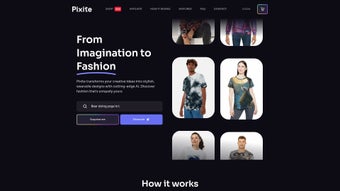

Download Pixite – AI‑Powered Custom Clothing Design Tool
Introduction
Pixite is transforming the custom‑apparel landscape by blending cutting‑edge artificial intelligence with an intuitive, browser‑based design environment. In today’s fashion‑forward market, consumers expect to wear clothing that reflects their personality, yet most traditional design tools demand steep learning curves, expensive software licenses, and powerful hardware. Pixite eliminates those barriers by allowing anyone—from seasoned graphic designers to hobbyists with no prior experience—to generate high‑resolution, print‑ready artwork simply by typing a descriptive prompt.
Imagine typing “vintage surf board with sunset gradient” and instantly receiving three polished graphics ready for a T‑shirt, hoodie, tote bag, or even a phone case. The platform’s AI engine interprets natural language, applies style‑aware algorithms, and delivers results in under 30 seconds. After generation, users can fine‑tune colors, reposition elements, and select exact garment sizes, ensuring the final product mirrors their vision.
Pixite also handles production end‑to‑end: each order passes through a double‑inspection printing workflow, guaranteeing vibrant colors, accurate placement, and defect‑free garments shipped directly to the buyer’s door. With a secure, GDPR‑compliant environment, free tier, and optional premium plans, Pixite offers a low‑risk, high‑reward entry point for entrepreneurs launching a merch line, teachers creating classroom gear, or individuals simply wanting a one‑of‑a‑kind tee. This review dives deep into the core features, usage flow, system compatibility, and real‑world pros and cons, helping you decide whether Pixite is the right tool for your custom clothing projects.
Core Features & How It Works
- AI‑Driven Design Generator: Convert natural‑language prompts into unique, high‑resolution graphics in seconds.
- Instant Color & Layout Editing: Integrated color picker and drag‑and‑drop tools let you adjust palettes, opacity, and element placement without leaving the browser.
- Multi‑Product Export: Designs can be applied to T‑shirts, hoodies, tote bags, phone cases, and more, expanding merchandising possibilities.
- 300 DPI+ Output: All images are produced at professional printing resolution, meeting industry standards for sharpness and detail.
- Quality‑First Printing Process: Each garment undergoes a double‑inspection protocol to catch any printing defects before shipping.
- Responsive Support Suite: Live chat, email assistance, and an extensive knowledge base keep users moving forward.
- Cross‑Platform Web Access: Fully functional on Windows, macOS, Android, and iOS browsers; no downloads required.
- Secure Payments & Data Handling: End‑to‑end SSL encryption, PCI‑DSS compliant checkout, and GDPR/CCPA compliance protect user information.
- Free Tier + Scalable Plans: Up to five designs per month at no cost; premium subscriptions unlock unlimited generations, bulk discounts, and priority support.
- Community Gallery & Remix: Browse, like, and remix designs from a vibrant user community for inspiration or collaboration.
Using Pixite is straightforward. After creating a free account, you land on a clean dashboard where you select a product type (e.g., T‑shirt). In the prompt field, you type a concise description—think “neon cactus under a starry sky” or “minimalist line art of a mountain range.” The AI processes the request, returning three distinct variations.
You can accept a design, ask for a regeneration, or fine‑tune the chosen version using the built‑in editor. Once satisfied, you select garment size, quantity, and any special printing notes, then proceed to checkout. The platform’s transparent pricing shows production costs, shipping fees, and any applicable discounts before you finalize the purchase.
After payment, a production ticket is generated, and you can monitor status updates in real time until the order arrives at your doorstep. This seamless flow—from idea to finished apparel—makes Pixite a compelling choice for rapid prototyping and small‑batch production without the overhead of traditional design software.
Compatibility, Pros & Cons
Compatibility: Because Pixite is a cloud‑native web application, it runs on any modern browser—Chrome, Edge, Safari, or Firefox—on desktop or mobile devices. Mobile users on Android 9+ or iOS 13+ enjoy the same feature set through a responsive layout. For those who prefer a native‑like experience, Pixite can be installed as a Progressive Web App (PWA), creating a desktop shortcut and enabling offline‑ready icons while still pulling updates from the server.
Pros
- Zero‑learning‑curve: No design software expertise required.
- Rapid AI generation: Designs appear in under 30 seconds.
- High‑resolution, print‑ready output meets professional standards.
- Cross‑platform accessibility eliminates OS restrictions.
- Generous free tier encourages experimentation.
- Secure, encrypted checkout protects personal and payment data.
- Responsive customer support and comprehensive help center.
- Scalable pricing model suitable for one‑off orders or bulk production.
- Community gallery fosters inspiration and collaboration.
- Optional PWA provides near‑native performance on desktops and mobiles.
Cons
- AI may produce unpredictable results with highly abstract or vague prompts.
- Free tier limits the number of monthly designs, which could hinder power users.
- Complex multi‑layer graphics sometimes need manual refinement after generation.
- Shipping times vary by region and peak demand periods, potentially delaying deliveries.
- Font library is modest compared to full‑featured design suites like Adobe Illustrator.
- Advanced branding features (e.g., custom Pantone matching) are only available in higher‑tier plans.
Frequently Asked Questions
Is Pixite truly free for casual users?
Yes. Pixite offers a free tier that allows up to five design generations per month, complete with 300 DPI output and standard shipping. Premium subscriptions remove this limit and add bulk‑order discounts, higher‑resolution exports, and priority support.
Do I need to install any software to use Pixite?
No installation is required. Pixite runs entirely in the browser. For a more app‑like feel, you can install the Progressive Web App (PWA) from your browser, which creates a desktop shortcut and enables offline caching.
How long does production and shipping take?
Standard production takes 2–3 business days. After that, standard shipping within the United States typically arrives in 4–7 days. Express shipping options are available at checkout for an additional fee.
Can I edit the AI‑generated artwork before ordering?
Absolutely. Pixite includes an in‑app editor where you can modify colors, reposition elements, add custom text, and adjust opacity. These tweaks are saved in real time and reflected in the final print file.
Is my personal and payment data safe on Pixite?
Pixite employs SSL/TLS encryption for all data transmission and complies with GDPR and CCPA regulations. Payment processing is handled by PCI‑DSS certified gateways, ensuring that credit‑card information never touches Pixite’s servers.
Conclusion & Call to Action
Pixite delivers a compelling blend of AI creativity, ease of use, and professional‑grade printing that makes custom apparel accessible to anyone with an internet connection. Its free tier lowers the entry barrier, while premium plans scale smoothly for growing merch businesses. The platform’s cross‑platform compatibility, secure infrastructure, and responsive support round out a solid value proposition.
Minor drawbacks—such as occasional AI quirks on abstract prompts and the modest free‑tier limit—are outweighed by the speed and flexibility Pixite provides. Whether you’re launching a startup merch line, teaching a class project, or simply looking to wear a design you imagined yourself, Pixite offers a fast, secure, and affordable path from idea to finished garment. Ready to turn your words into wearable art?
Create your free account today, generate your first design, and experience the future of custom clothing.



.png)



